

Highlight what’s great in pictures
This is what makes these images special.
Highlight what’s great in pictures
This is what makes these images special.
Highlight what’s great in pictures
This is what makes these images special.
Highlight what’s great in pictures
This is what makes these images special.
GO360 - CRM

Building a CRM
Around the Business
From scattered data and disconnected workflows to one platform used by more than 350 employees.
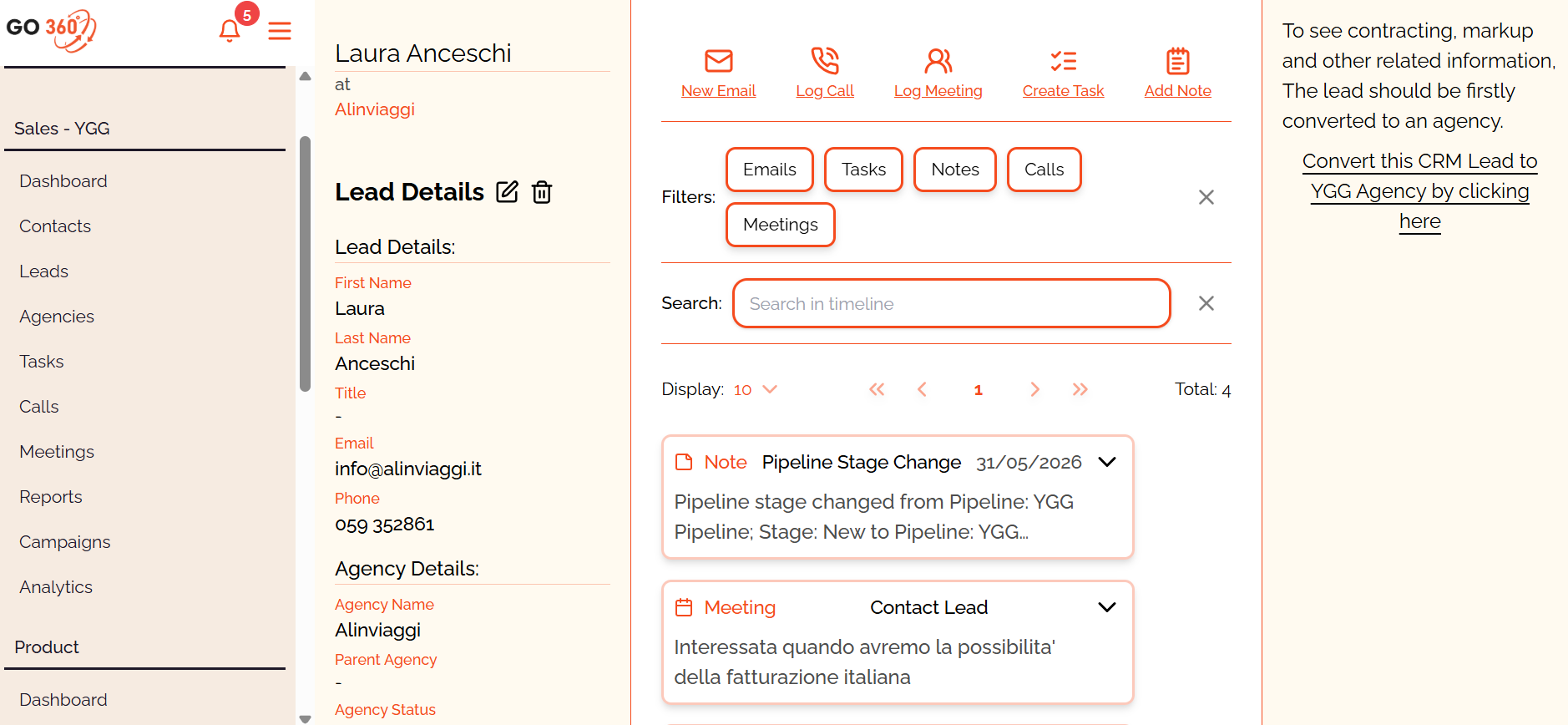
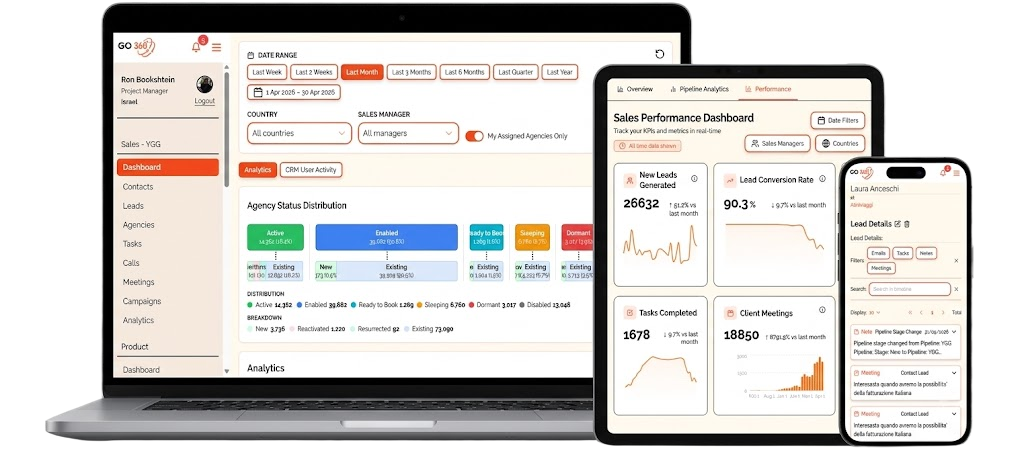
GO360 is an enterprise CRM that I conceived and led from discovery to launch for Yanolja Go Global. It connects customer data, sales activity, internal workflows and business intelligence in one product, built specifically around how the company operates.
My role: Product ManagerProduct: Enterprise B2B CRMUsers: 350+ employeesScale: 32,000+ companies and 212,000+ contactsDelivery: 40+ features
The Challenge
The company had grown. Its tools hadn’t grown with it.
Customer information was spread across spreadsheets, emails and disconnected platforms. Teams had no single view of their customers, sales opportunities or ongoing activity.
What started as a request from Sales quickly revealed a much larger opportunity: to create a shared product that could support Sales, Marketing, Finance, Product, BI and other teams across the company.
The challenge wasn’t simply to build another CRM. It was to understand how different departments worked, and turn those differences into one coherent product.

Read More
My Role
I owned the product from the first conversation to the weekly releases.
I defined the product vision, led discovery, created the roadmap and prioritized what we would build. I worked closely with stakeholders across the organization and led a dedicated team of six developers through design, delivery and continuous improvement.
My work covered the entire product cycle:
- User and stakeholder interviews
- Product vision and roadmap
- Requirements and user stories
- User flows and interface design
- Interactive prototypes
- Sprint planning and prioritization
- QA and release validation
- Adoption and performance analysis
Discovery
Before designing screens, I needed to understand the company.
I conducted many interviews and working sessions with people across Sales, Marketing, Finance, BI, Product, Support and senior management.
Rather than asking people which features they wanted, I focused on how they actually worked:
- Where did information originate?
- Which tasks consumed the most time?
- Where did leads get lost?
- Which decisions were being made without enough data?
- Which processes depended on spreadsheets or manual follow-ups?
- What would make employees trust and adopt a new system?
These conversations helped turn fragmented departmental requests into shared problems that the product could solve.

The Solution
One CRM, designed around many ways of working.
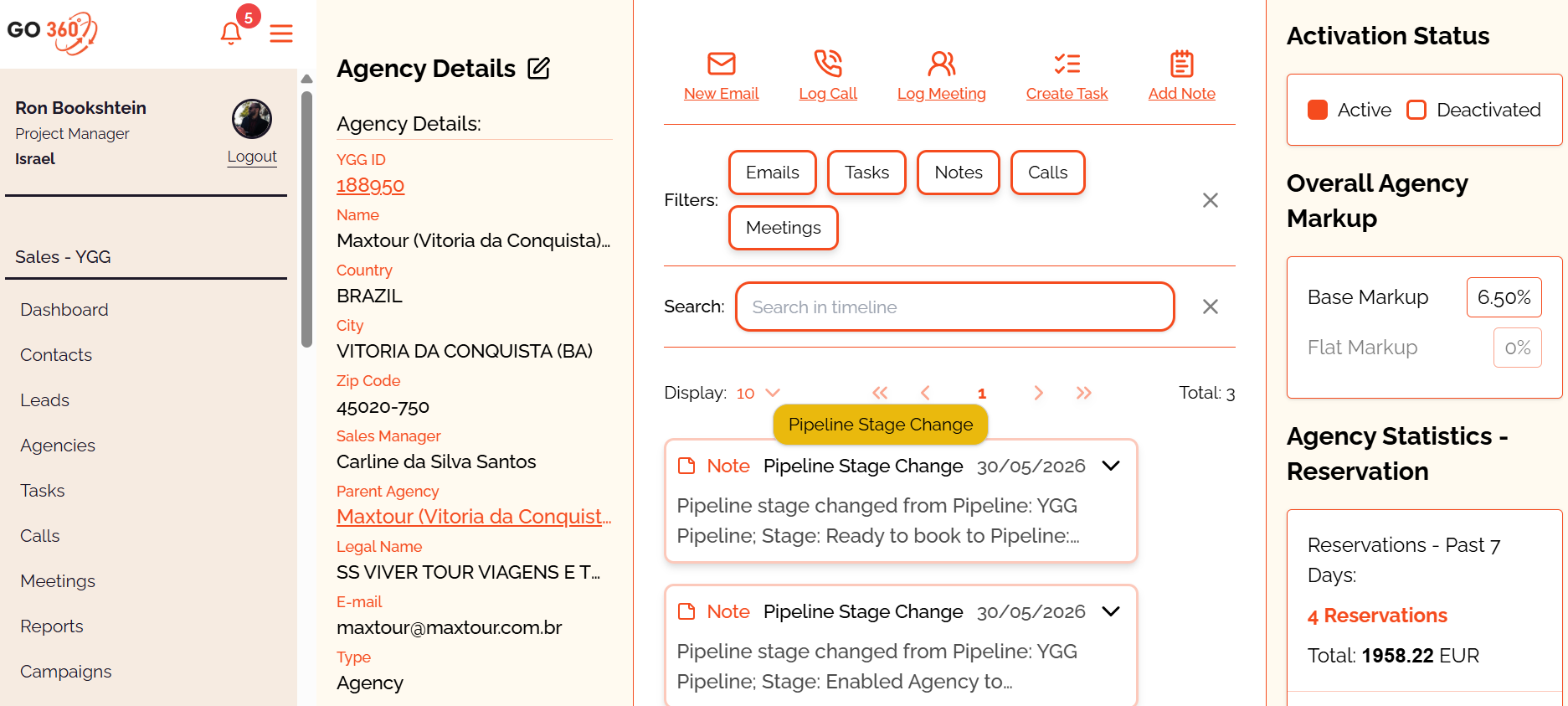
GO360 became a central workspace where employees could understand a customer, manage activity and take action without moving between disconnected tools.
The platform brought together:
- Companies, agencies, contacts and leads
- Sales activities and follow-ups
- Tasks, notes and communication history
- Lead allocation and ownership
- Customer segmentation
- Campaign and marketing information
- Credit and financial information
- Reports, dashboards and business intelligence
- Internal and third-party integrations
Every major workflow was designed and tested with the people who would ultimately use it.
Designing for
Different Teams
A useful CRM cannot force everyone into the same workflow.
Sales needed speed and visibility. Marketing needed segmentation and campaign data. Management needed performance insights. Finance and BI needed reliable, structured information.
Instead of creating one rigid experience, I designed a shared foundation with workflows and views suited to different roles.
This allowed each team to work in its own way while contributing to the same source of customer information.
Analytics
Turning the CRM from a database into a decision-making tool.
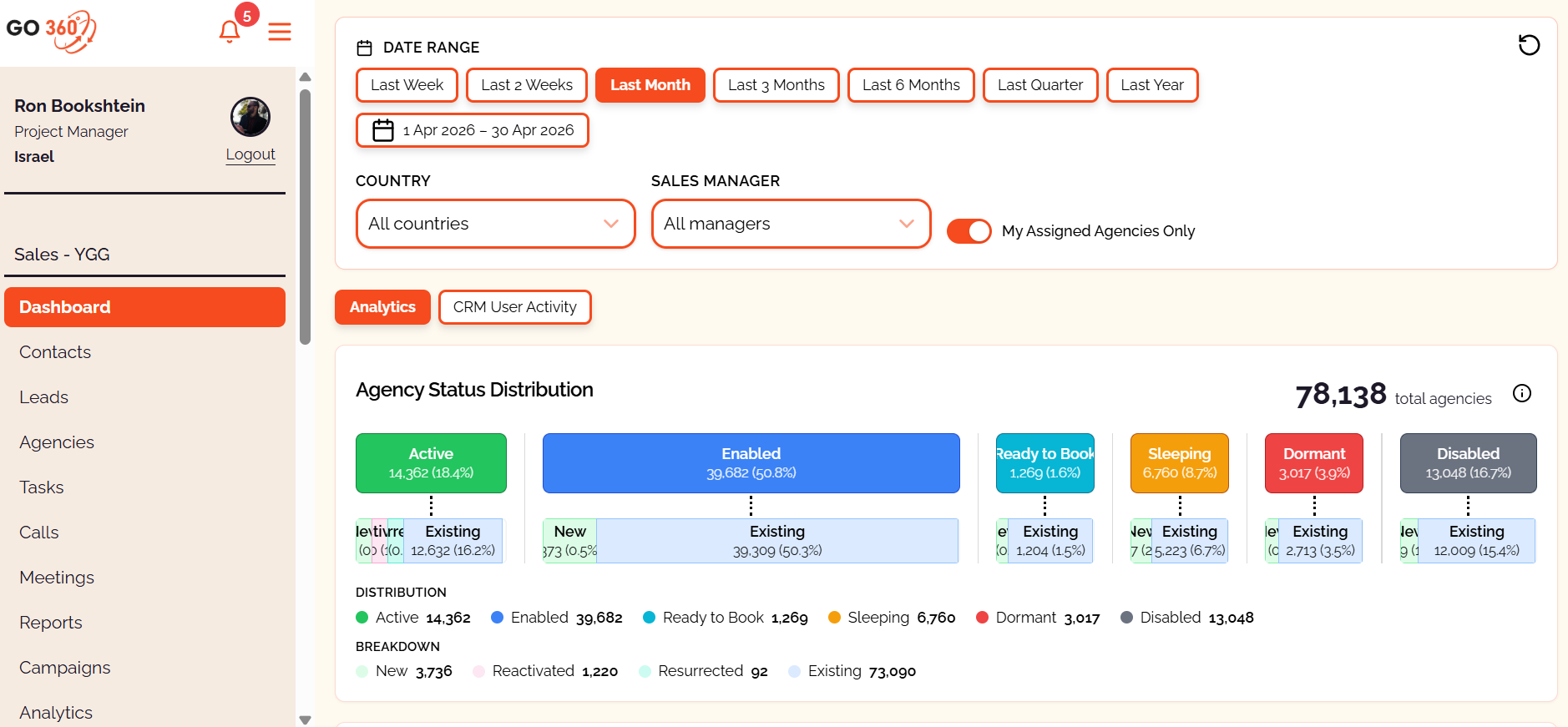
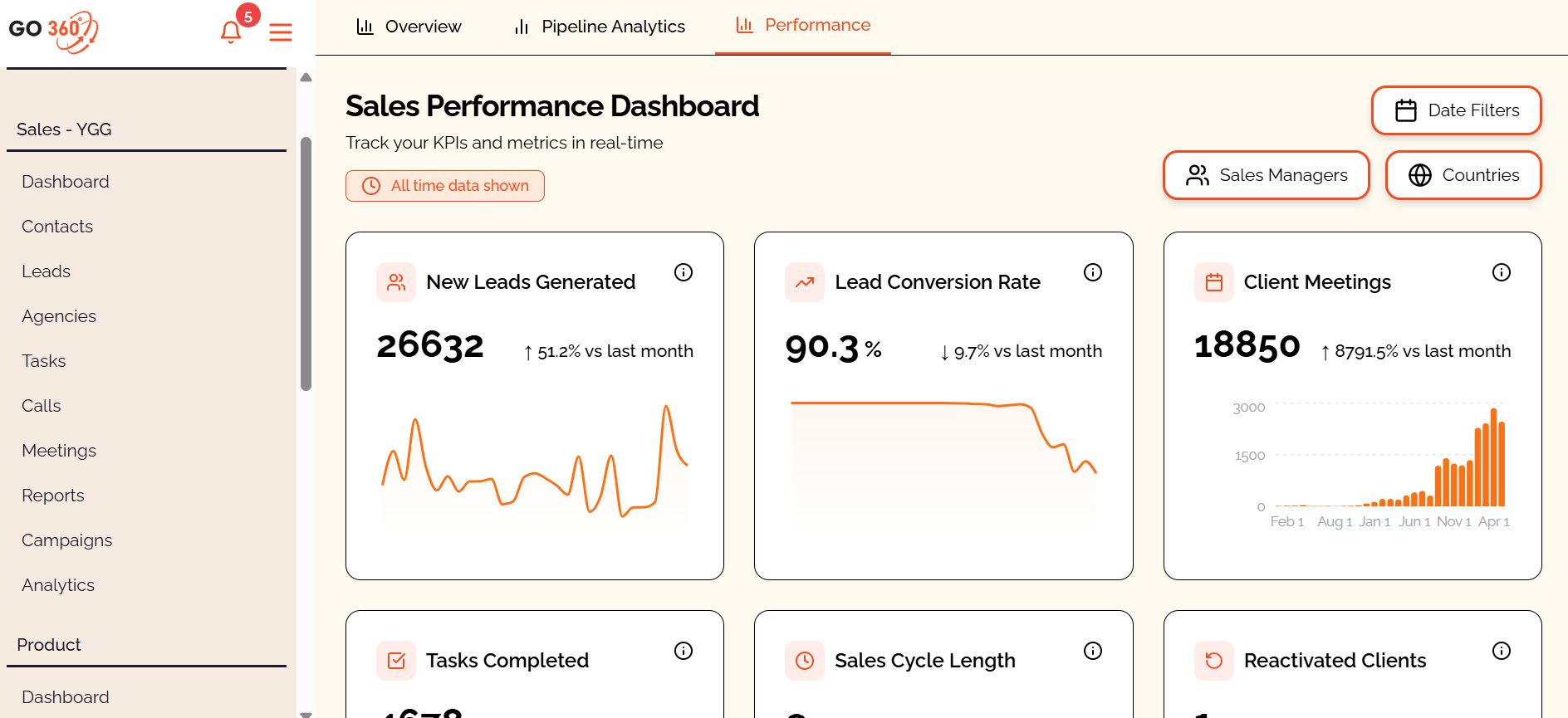
One of the most complex parts of GO360 was its analytics platform.
I worked with users and the BI team to define the questions each report needed to answer, not merely which data it should display.
The resulting dashboards helped teams monitor activity, evaluate lead engagement, identify missed opportunities and understand performance across regions, teams and customer segments.
The objective was simple: make information easier to act on, not just easier to find.
AI and Automation
Removing small tasks that created large amounts of friction.
As the platform evolved, I explored ways to use AI and automation to reduce repetitive work and help employees act faster.
This included:
- A mobile business-card scanner using computer vision to create leads automatically
- AI-assisted CRM analytics
- Route-planning tools for sales teams
- Automated data enrichment and categorization
- AI-generated prototypes for validating new workflows before development
These features weren’t introduced because AI was fashionable.
They were introduced where automation could genuinely remove effort or improve a decision.


Contents



From Prototype to Product
Making ideas tangible before asking developers to build them.
For complex features, I created interactive prototypes after speaking with the relevant users and stakeholders.
The prototypes allowed us to test workflows, identify missing requirements and align expectations before development began.
They also gave the four-person development team a much clearer representation of the intended experience.
This reduced ambiguity, improved implementation accuracy and made stakeholder feedback more useful
Integrations
GO360 connects with internal systems and external platforms to bring important information into one place.
The integrations I worked with included:
- Yanolja Go Global APIs
- Qlik
- Databricks
- Microsoft Azure Computer Vision
- Monday.com
- ActiveCampaign
- Google Maps
The goal was not integration for its own sake. Each connection removed a manual step, eliminated duplicated information or gave users a more complete view of the customer.
The Impact
GO360 became part of how the company works every day.
The CRM grew from an initial Sales request into an enterprise platform used by more than 350 employees.
Today, it supports:
- 350+ employees
- 32,000+ companies
- 212,000+ contacts and leads
- 40+ product features
- 55% growth in lead engagement
- Weekly product releases
Beyond the numbers, its most important result was creating a shared way for teams to understand and work with customers.
GO360 didn’t begin as a software project. It began as a collection of business problems, and became the product connecting them.
Home

Highlight what’s great in pictures
This is what makes these images special.
Highlight what’s great in pictures
This is what makes these images special.
Highlight what’s great in pictures
This is what makes these images special.
Highlight what’s great in pictures
This is what makes these images special.
Highlight what’s great in pictures
This is what makes these images special.
GO360 - CRM
Building a CRM Around the Business
From scattered data and disconnected workflows to one platform used by more than 350 employees.
GO360 is an enterprise CRM that I conceived and led from discovery to launch for Yanolja Go Global. It connects customer data, sales activity, internal workflows and business intelligence in one product, built specifically around how the company operates.
My role: Product ManagerProduct: Enterprise B2B CRMUsers: 350+ employeesScale: 32,000+ companies and 212,000+ contactsDelivery: 40+ features
The Challenge
The company had grown. Its tools hadn’t grown with it.
Customer information was spread across spreadsheets, emails and disconnected platforms. Teams had no single view of their customers, sales opportunities or ongoing activity.
What started as a request from Sales quickly revealed a much larger opportunity: to create a shared product that could support Sales, Marketing, Finance, Product, BI and other teams across the company.
The challenge wasn’t simply to build another CRM. It was to understand how different departments worked, and turn those differences into one coherent product.
My Role
I owned the product from the first conversation to the weekly releases.
I defined the product vision, led discovery, created the roadmap and prioritized what we would build. I worked closely with stakeholders across the organization and led a dedicated team of six developers through design, delivery and continuous improvement.
My work covered the entire product cycle:
- User and stakeholder interviews
- Product vision and roadmap
- Requirements and user stories
- User flows and interface design
- Interactive prototypes
- Sprint planning and prioritization
- QA and release validation
- Adoption and performance analysis

Discovery
Before designing screens, I needed to understand the company.
I conducted many interviews and working sessions with people across Sales, Marketing, Finance, BI, Product, Support and senior management.
Rather than asking people which features they wanted, I focused on how they actually worked:
- Where did information originate?
- Which tasks consumed the most time?
- Where did leads get lost?
- Which decisions were being made without enough data?
- Which processes depended on spreadsheets or manual follow-ups?
- What would make employees trust and adopt a new system?
These conversations helped turn fragmented departmental requests into shared problems that the product could solve.
The Solution
One CRM, designed around many ways of working.
GO360 became a central workspace where employees could understand a customer, manage activity and take action without moving between disconnected tools.
The platform brought together:
- Companies, agencies, contacts and leads
- Sales activities and follow-ups
- Tasks, notes and communication history
- Lead allocation and ownership
- Customer segmentation
- Campaign and marketing information
- Credit and financial information
- Reports, dashboards and business intelligence
- Internal and third-party integrations
Every major workflow was designed and tested with the people who would ultimately use it.
Designing for Different Teams
A useful CRM cannot force everyone into the same workflow.
Sales needed speed and visibility. Marketing needed segmentation and campaign data. Management needed performance insights. Finance and BI needed reliable, structured information.
Instead of creating one rigid experience, I designed a shared foundation with workflows and views suited to different roles.
This allowed each team to work in its own way while contributing to the same source of customer information.
Analytics
Turning the CRM from a database into a decision-making tool.
One of the most complex parts of GO360 was its analytics platform.
I worked with users and the BI team to define the questions each report needed to answer, not merely which data it should display.
The resulting dashboards helped teams monitor activity, evaluate lead engagement, identify missed opportunities and understand performance across regions, teams and customer segments.
The objective was simple: make information easier to act on, not just easier to find.
AI and Automation
Removing small tasks that created large amounts of friction.
As the platform evolved, I explored ways to use AI and automation to reduce repetitive work and help employees act faster.
This included:
- A mobile business-card scanner using computer vision to create leads automatically
- AI-assisted CRM analytics
- Route-planning tools for sales teams
- Automated data enrichment and categorization
- AI-generated prototypes for validating new workflows before development
These features weren’t introduced because AI was fashionable.
They were introduced where automation could genuinely remove effort or improve a decision.


Contents
From Prototype to Product
Making ideas tangible before asking developers to build them.
For complex features, I created interactive prototypes after speaking with the relevant users and stakeholders.
The prototypes allowed us to test workflows, identify missing requirements and align expectations before development began.
They also gave the four-person development team a much clearer representation of the intended experience.
This reduced ambiguity, improved implementation accuracy and made stakeholder feedback more useful
Integrations
GO360 connects with internal systems and external platforms to bring important information into one place.
The integrations I worked with included:
- Yanolja Go Global APIs
- Qlik
- Databricks
- Microsoft Azure Computer Vision
- Monday.com
- ActiveCampaign
- Google Maps
The goal was not integration for its own sake. Each connection removed a manual step, eliminated duplicated information or gave users a more complete view of the customer.
The Impact
GO360 became part of how the company works every day.
The CRM grew from an initial Sales request into an enterprise platform used by more than 350 employees.
Today, it supports:
- 350+ employees
- 32,000+ companies
- 212,000+ contacts and leads
- 40+ product features
- 55% growth in lead engagement
- Weekly product releases
Beyond the numbers, its most important result was creating a shared way for teams to understand and work with customers.
GO360 didn’t begin as a software project. It began as a collection of business problems, and became the product connecting them.
Back To Homepage|
Highlight what’s great in pictures
This is what makes these images special.
Building a CRM Around the Business
From scattered data and disconnected workflows to one platform used by more than 350 employees.
GO360 is an enterprise CRM that I conceived and led from discovery to launch for Yanolja Go Global. It connects customer data, sales activity, internal workflows and business intelligence in one product, built specifically around how the company operates.
My role: Product ManagerProduct: Enterprise B2B CRMUsers: 350+ employeesScale: 32,000+ companies and 212,000+ contactsDelivery: 40+ features
Read More
The Solution
One CRM, designed around many ways of working.
GO360 became a central workspace where employees could understand a customer, manage activity and take action without moving between disconnected tools.
The platform brought together:
- Companies, agencies, contacts and leads
- Sales activities and follow-ups
- Tasks, notes and communication history
- Lead allocation and ownership
- Customer segmentation
- Campaign and marketing information
- Credit and financial information
- Reports, dashboards and business intelligence
- Internal and third-party integrations
Every major workflow was designed and tested with the people who would ultimately use it.
Designing for Different Teams
A useful CRM cannot force everyone into the same workflow.
Sales needed speed and visibility. Marketing needed segmentation and campaign data. Management needed performance insights. Finance and BI needed reliable, structured information.
Instead of creating one rigid experience, I designed a shared foundation with workflows and views suited to different roles.
This allowed each team to work in its own way while contributing to the same source of customer information.
Analytics
Turning the CRM from a database into a decision-making tool.
One of the most complex parts of GO360 was its analytics platform.
I worked with users and the BI team to define the questions each report needed to answer, not merely which data it should display.
The resulting dashboards helped teams monitor activity, evaluate lead engagement, identify missed opportunities and understand performance across regions, teams and customer segments.
The objective was simple: make information easier to act on, not just easier to find.
AI and Automation
Removing small tasks that created large amounts of friction.
As the platform evolved, I explored ways to use AI and automation to reduce repetitive work and help employees act faster.
This included:
- A mobile business-card scanner using computer vision to create leads automatically
- AI-assisted CRM analytics
- Route-planning tools for sales teams
- Automated data enrichment and categorization
- AI-generated prototypes for validating new workflows before development
These features weren’t introduced because AI was fashionable.
They were introduced where automation could genuinely remove effort or improve a decision.
Photos
Contents
From Prototype to Product
Making ideas tangible before asking developers to build them.
For complex features, I created interactive prototypes after speaking with the relevant users and stakeholders.
The prototypes allowed us to test workflows, identify missing requirements and align expectations before development began.
They also gave the four-person development team a much clearer representation of the intended experience.
This reduced ambiguity, improved implementation accuracy and made stakeholder feedback more useful
Integrations
GO360 connects with internal systems and external platforms to bring important information into one place.
The integrations I worked with included:
- Yanolja Go Global APIs
- Qlik
- Databricks
- Microsoft Azure Computer Vision
- Monday.com
- ActiveCampaign
- Google Maps
The goal was not integration for its own sake. Each connection removed a manual step, eliminated duplicated information or gave users a more complete view of the customer.
The Impact
GO360 became part of how the company works every day.
The CRM grew from an initial Sales request into an enterprise platform used by more than 350 employees.
Today, it supports:
- 350+ employees
- 32,000+ companies
- 212,000+ contacts and leads
- 40+ product features
- 55% growth in lead engagement
- Weekly product releases
Beyond the numbers, its most important result was creating a shared way for teams to understand and work with customers.
GO360 didn’t begin as a software project. It began as a collection of business problems, and became the product connecting them.
GO360 - CRM
My Role
I owned the product from the first conversation to the weekly releases.
I defined the product vision, led discovery, created the roadmap and prioritized what we would build. I worked closely with stakeholders across the organization and led a dedicated team of six developers through design, delivery and continuous improvement.
My work covered the entire product cycle:
- User and stakeholder interviews
- Product vision and roadmap
- Requirements and user stories
- User flows and interface design
- Interactive prototypes
- Sprint planning and prioritization
- QA and release validation
- Adoption and performance analysis
Back To Homepage|
The Challenge
The company had grown. Its tools hadn’t grown with it.
Customer information was spread across spreadsheets, emails and disconnected platforms. Teams had no single view of their customers, sales opportunities or ongoing activity.
What started as a request from Sales quickly revealed a much larger opportunity: to create a shared product that could support Sales, Marketing, Finance, Product, BI and other teams across the company.
The challenge wasn’t simply to build another CRM. It was to understand how different departments worked, and turn those differences into one coherent product.
My Role
I owned the product from the first conversation to the weekly releases.
I defined the product vision, led discovery, created the roadmap and prioritized what we would build. I worked closely with stakeholders across the organization and led a dedicated team of four developers through design, delivery and continuous improvement.
My work covered the entire product cycle:
- User and stakeholder interviews
- Product vision and roadmap
- Requirements and user stories
- User flows and interface design
- Interactive prototypes
- Sprint planning and prioritization
- QA and release validation
- Adoption and performance analysis
Discovery
Before designing screens, I needed to understand the company.
I conducted many interviews and working sessions with people across Sales, Marketing, Finance, BI, Product, Support and senior management.
Rather than asking people which features they wanted, I focused on how they actually worked:
- Where did information originate?
- Which tasks consumed the most time?
- Where did leads get lost?
- Which decisions were being made without enough data?
- Which processes depended on spreadsheets or manual follow-ups?
- What would make employees trust and adopt a new system?
These conversations helped turn fragmented departmental requests into shared problems that the product could solve.
The Solution
One CRM, designed around many ways of working.
GO360 became a central workspace where employees could understand a customer, manage activity and take action without moving between disconnected tools.
The platform brought together:
- Companies, agencies, contacts and leads
- Sales activities and follow-ups
- Tasks, notes and communication history
- Lead allocation and ownership
- Customer segmentation
- Campaign and marketing information
- Credit and financial information
- Reports, dashboards and business intelligence
- Internal and third-party integrations
Every major workflow was designed and tested with the people who would ultimately use it.
Designing for Different Teams
A useful CRM cannot force everyone into the same workflow.
Sales needed speed and visibility. Marketing needed segmentation and campaign data. Management needed performance insights. Finance and BI needed reliable, structured information.
Instead of creating one rigid experience, I designed a shared foundation with workflows and views suited to different roles.
This allowed each team to work in its own way while contributing to the same source of customer information.
Analytics
Turning the CRM from a database into a decision-making tool.
One of the most complex parts of GO360 was its analytics platform.
I worked with users and the BI team to define the questions each report needed to answer, not merely which data it should display.
The resulting dashboards helped teams monitor activity, evaluate lead engagement, identify missed opportunities and understand performance across regions, teams and customer segments.
The objective was simple: make information easier to act on, not just easier to find.
From Prototype to Product
Making ideas tangible before asking developers to build them.
For complex features, I created interactive prototypes after speaking with the relevant users and stakeholders.
The prototypes allowed us to test workflows, identify missing requirements and align expectations before development began.
They also gave the four-person development team a much clearer representation of the intended experience.
This reduced ambiguity, improved implementation accuracy and made stakeholder feedback more useful
Integrations
GO360 connects with internal systems and external platforms to bring important information into one place.
The integrations I worked with included:
- Yanolja Go Global APIs
- Qlik
- Databricks
- Microsoft Azure Computer Vision
- Monday.com
- ActiveCampaign
- Google Maps
The goal was not integration for its own sake. Each connection removed a manual step, eliminated duplicated information or gave users a more complete view of the customer.
The Impact
GO360 became part of how the company works every day.
The CRM grew from an initial Sales request into an enterprise platform used by more than 350 employees.
Today, it supports:
- 350+ employees
- 32,000+ companies
- 212,000+ contacts and leads
- 40+ product features
- 55% growth in lead engagement
- Weekly product releases
Beyond the numbers, its most important result was creating a shared way for teams to understand and work with customers.
AI and Automation
Removing small tasks that created large amounts of friction.
As the platform evolved, I explored ways to use AI and automation to reduce repetitive work and help employees act faster.
This included:
- A mobile business-card scanner using computer vision to create leads automatically
- AI-assisted CRM analytics
- Route-planning tools for sales teams
- Automated data enrichment and categorization
- AI-generated prototypes for validating new workflows before development
These features weren’t introduced because AI was fashionable.
They were introduced where automation could genuinely remove effort or improve a decision.